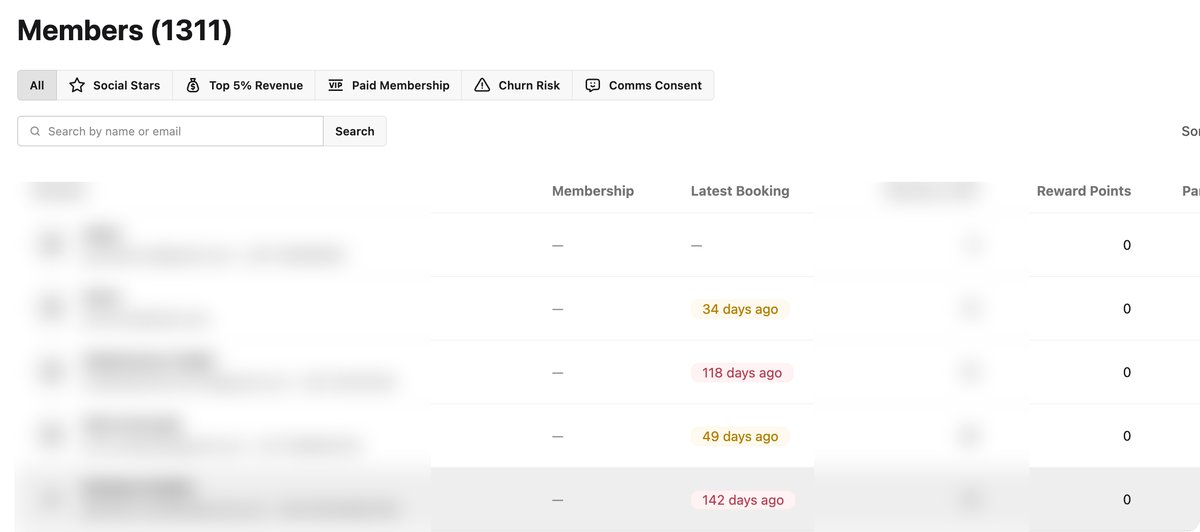
The SmashClub CRM is the player list behind your club app: every player who registers in your app or web portal, plus the booking history that comes in from your booking platform, in one place. Segments, email campaigns, push and WhatsApp messages and the Insights screens are built on top of it. It is made for the person who runs the club day to day, not for a sales team.
What data you get, and where it comes from
Three sources feed a player's profile. Knowing which is which tells you what you will see on day one and what grows over time.
From the booking platform integration
With the Playtomic integration, a player's bookings flow into SmashClub: past and upcoming bookings, booking type (regular booking, open match, class, tournament, league), the player's share of booking revenue, who they played with, their Playtomic padel level and the communication consent they gave in Playtomic. Players appear in your list from their booking history, before they ever open your app. When they register, the account is matched to their Playtomic profile by email (a matching phone number helps); if there is no clear match, the player links it in two taps. Until then, bookings and booking points do not show on that profile.
From registration in your app or portal
Name, email and, optionally, phone; gender; acceptance of your terms and waiver, recorded on the profile; membership plan (everyone starts on your free Basic plan); reward points earned and spent; events joined; check-ins at the club; Junior Academy enrollments made by a parent. This data exists for every club, with or without a booking integration.
Depends on consent
Whether you may email or message a player. SmashClub keeps a communication-consent flag from your app and, if connected, the one from Playtomic. Campaigns go only to the delivery audience: players with a valid address who have not unsubscribed. A player can be in your list and still be off-limits for marketing; the CRM shows you both numbers before you send.
Three things a club manager does with it
1. Find the players who stopped coming
Screen: Customers, segment Churn risk. It lists players with three or more bookings 30 to 90 days ago, none in the last 30 days and nothing upcoming.
Action: open Campaigns, pick the segment, send one email with a concrete reason to come back: this week's Americano, an event with early access for members, a reward they can claim with the points they already have. Push notifications and WhatsApp are available as channels too.
What you get: you reach these players while they still think of themselves as your players, instead of noticing in the annual numbers. How many come back depends on the offer and the club; the CRM gives you the list and the channel, not a guaranteed percentage.
2. Know who your active core is
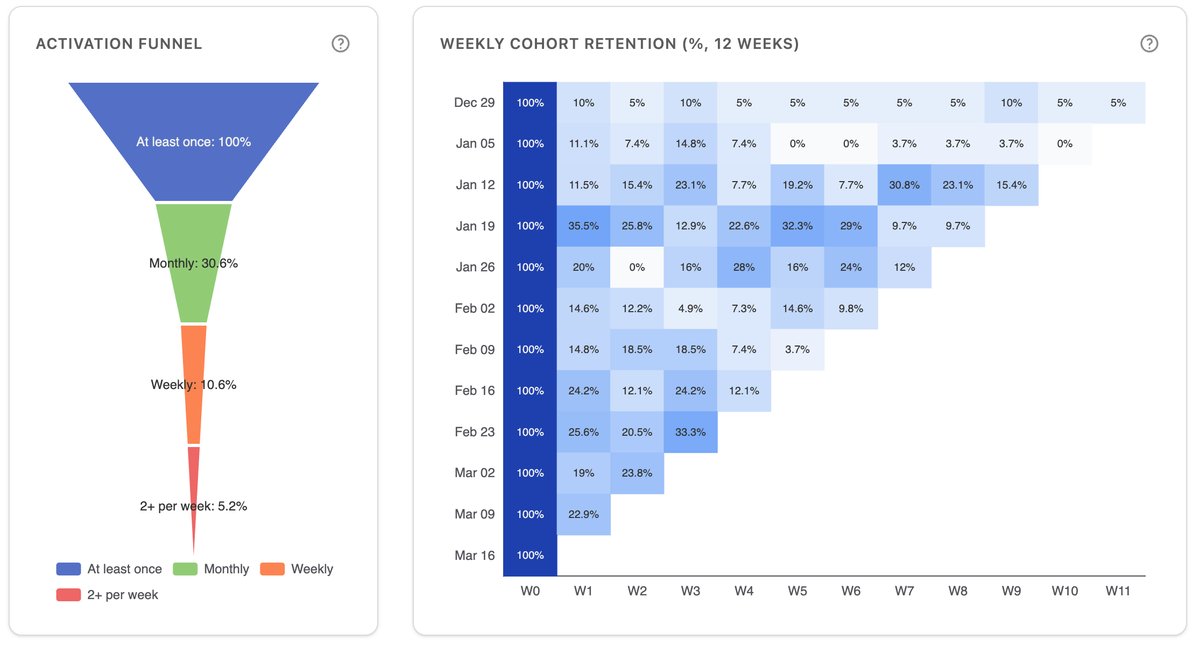
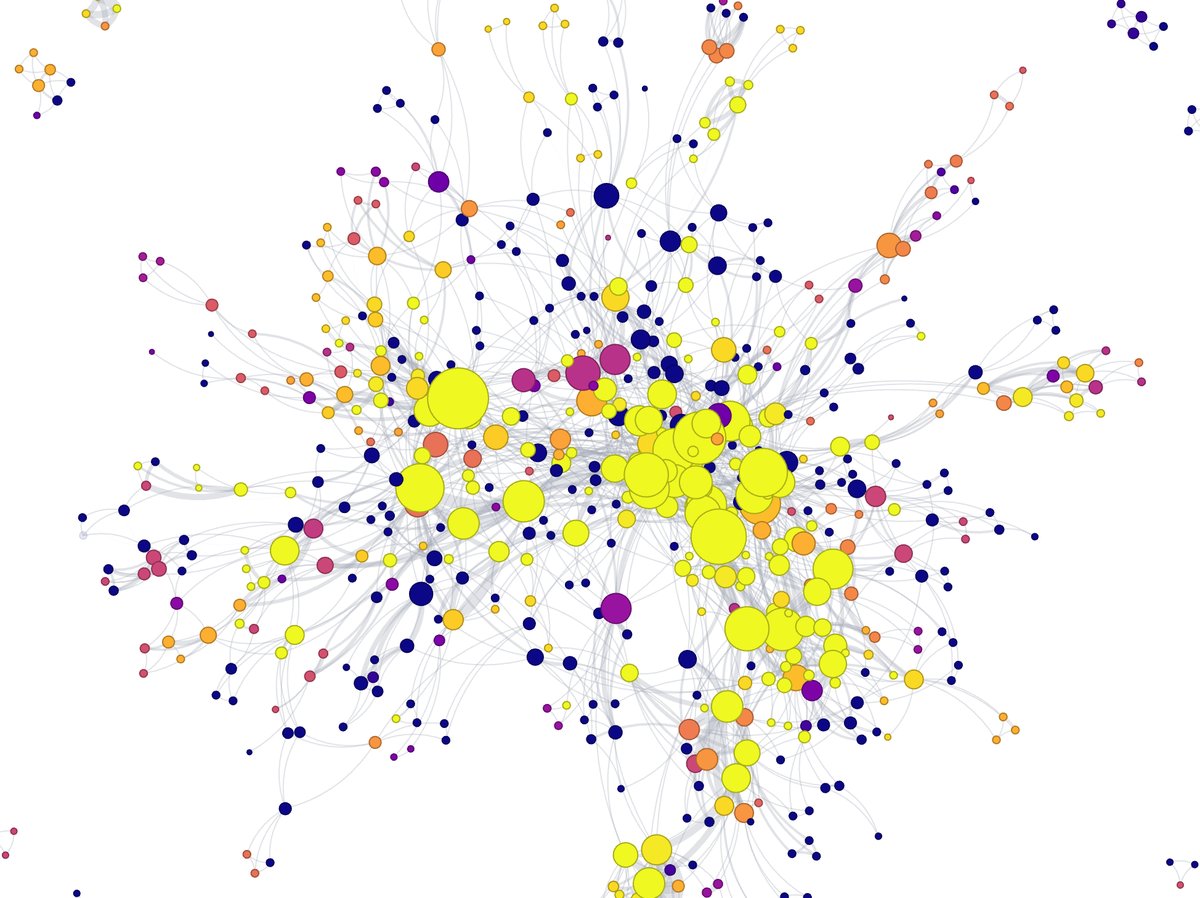
Screen: segments Top 5% revenue, Social stars (the players with the widest range of partners) and Paid membership; the Insights tab shows the activation funnel from first booking to weekly regular and a 12-week cohort retention table.
Action: invite the core to a members-only event, give them early access, grant points for a review or a referral, or simply greet them by name at the desk. Social stars are the people who bring others: when one of them drifts, their partners often follow.
What you get: a short, named list of the players your revenue actually rests on, refreshed automatically as bookings come in.
3. Build a group for the offer that fits
Screen: Customers, new segment with your own conditions: bookings in the last 60 days, Playtomic level between 3.0 and 4.0, no paid membership, 1,000+ points to spend, gender, consent. Conditions combine with AND; saved segments update themselves.
Action: send the offer that matches the group: a level-matched Americano, the membership plan that pays off at their booking frequency, a reward reminder to players sitting on unused points. Export the segment as CSV if you want to work the list by phone.
What you get: fewer messages, each one relevant. The same segment feeds Klaviyo if you run automated flows there.
What is in the CRM
- Members list with search, membership plan, latest booking, reward points and playing partners; per-player view of bookings, points activity and membership.
- Six ready-made segments: Communications consent, Paid membership, Churn risk, Social stars, Top 5% revenue, Points to spend. Plus your own, on bookings, revenue, plan, points, partners, level, gender, consent and academy enrollment.
- Email campaigns to a segment from your own domain and branding: rich text, hero image, button, test send, delivery results per recipient. There is no open or click tracking in the console; for that, connect Klaviyo.
- Push notifications and WhatsApp as additional channels, switched on for your club on request.
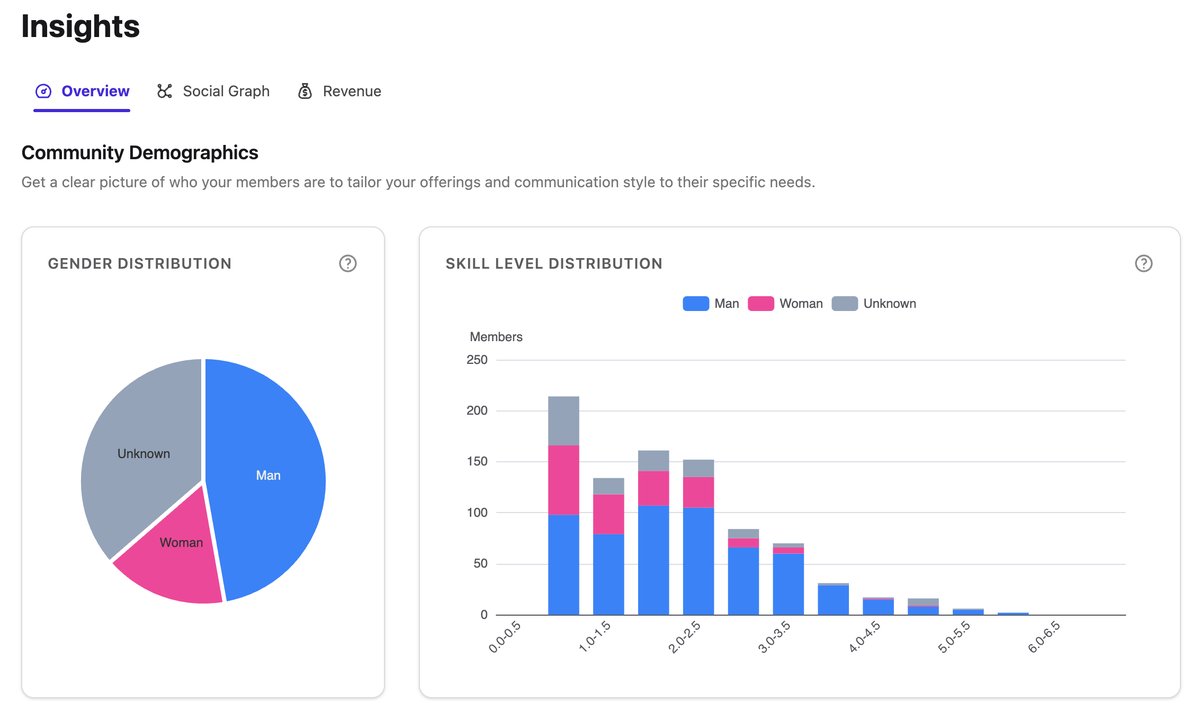
- Insights: gender and skill-level distribution, social graph of who plays with whom, revenue by booking type, activation funnel and 12-week cohort retention.
- Actions on a player: grant or change a membership, grant points, fulfil a reward, review a membership request, see check-ins.
- Export and sync: CSV export of any segment; membership, points, booking and check-in events pushed to Klaviyo.
How it is set up, and the limits of the integration
- Connect the booking platform. Playtomic: the club provides its API access and we connect it. Playbypoint is live as well. For other systems (MATCHi, Matchpoint, in-house tools) the integration depends on the API that system offers; we confirm what is possible for your club before you sign, not after.
- Set up the club. Stripe for payments, membership plans, points rules, your branding in the app and portal. A club is live in 1-2 working days.
- Players join. Through the QR code at the desk or a join link; existing bookers are matched by email when they register.
- Data fills in. Booking history and segments populate from the integration; membership, points and consent from your app. Insights need a few weeks of bookings before cohorts and funnels say anything useful.
What the integration does not do. Court booking stays in your booking platform; SmashClub does not take or change bookings. It does not change prices or member discounts in the booking platform: when a membership starts or ends, SmashClub creates a task telling staff which category to set there. A player's bookings show on their profile only after their account is linked. Campaign emails are sent and tracked to delivery, not to opens or clicks.
What SmashClub adds next to your booking platform
Your booking platform is where courts are sold and paid for, and it does that job well. What a club rarely has there is its own view of the player across time: who is drifting, who holds the community together, who is ready for a membership. SmashClub adds that layer under your own brand, without replacing anything:
- one player list that joins bookings, membership, points, events and consent;
- segments built on play behaviour, not on manual tags;
- your own channel to the player: app, portal, email, push, WhatsApp;
- the Insights screens: demographics, social graph, revenue, cohorts;
- the same setup if you ever change booking systems: the app, the members and the points stay, only the booking source changes.
Some booking platforms offer parts of this inside their own product. The difference is where it lives and who it belongs to. In SmashClub the app, the data and the member relationship carry your club's name, and the CRM works the same way for a club on Playtomic, on Playbypoint or on both.
Frequently Asked Questions
What data does the SmashClub CRM track?
Booking history and booking type from your booking platform, who plays with whom, Playtomic padel level, booking revenue share, membership plan and its source, reward points earned and spent, events, check-ins, Junior Academy enrollments and communication consent. Profile basics come from the player's registration in your app or portal.
Do I need to enter player information manually?
No. Players enter their own details when they register, and the booking integration adds their bookings. Staff can still grant memberships or points by hand when needed, for example for a legacy member.
How does the CRM help with retention?
It shows you who is drifting before they are gone (the Churn risk segment), who your core is (Top 5% revenue, Social stars) and how new players convert to regulars (activation funnel, cohort table). You act on that with campaigns, events, rewards and memberships. It is a tool for timely, targeted contact; the result depends on what you offer and how your club runs.
Which booking platforms are supported?
Playtomic and Playbypoint integrations are live. For other systems we check the available API with you before committing. A club without an integration still gets the full CRM for everything that happens in its own app: memberships, points, events, check-ins and consent.
Is player data GDPR-compliant?
The club owns its player data and SmashClub provides a data processing agreement. Terms and waiver acceptance are recorded at sign-up, marketing goes only to players with consent, and campaign emails carry an unsubscribe link handled automatically.
See your players as a list you can act on
Book a 30-minute demo. We walk through a live console and build the segment you would send to tomorrow.
Book a demo →